Using strings on Arduino can be very simple – there’s a class called String – but, on the other hand, it uses a lot of memory on a device that’s very limited in this regard. This presents a few ways to mitigate memory usage using strings.
When you’re starting out with Arduino, the first example you’ll find for using strings is the String class. It’s very simple to use and contains many useful methods for manipulation of the text. It actually closely resembles the Java String class, providing almost the same convenience.
String stringOne = "Hello String"; // using a constant string
String stringOne = String('a');    // converting a constant character to a StringCode language: JavaScript (javascript)
However, this ease and flexibility comes at a relatively high price:


In the examples above, the texts declared as char[] and String are exactly the same; however, the difference in allocated memory is 28 bytes. It may not seem a lot, but considering that this difference tends to increase when using string manipulation methods, and that an Arduino Nano’s memory doesn’t exceed 2KB, this small difference can be crucial for a program to run or not due to the restriction.
Alternatives
To avoid high memory usage with strings, there are two possible alternatives:
- char[]: For dynamic strings, created and manipulated at runtime, char arrays should be used.
- PROGMEM char[]: For static strings that don’t change, such as labels, or information to be sent via Serial, PROGMEM char[] is the recommended option.
Char Arrays (char[])
The 0-terminated char[] array, as shown in the images above, takes up less RAM. However, notably, although its initialization is generally simple, its manipulation is more complicated:
char my_string[] = "initialized string";Code language: JavaScript (javascript)Concatenation cannot be performed using the “+” sign. Instead, you must use the strcat() function, as in the example below.
char my_string[25];
strcpy(my_string, "initialized string");
strcat(my_string, "- OK");Code language: JavaScript (javascript)
To define a function or method that accepts char[], you must use char *:
void add_suffix(char* str2suffix) {
  strcat(str2suffix, "...");
}

char my_string[25];
strcpy(my_string, "Loading");
add_suffix(my_string);Code language: JavaScript (javascript)
Finally, it is important to keep in mind that the values to be concatenated cannot exceed the size allocated for char[].
Otherwise, the concatenated content will extend beyond the allocated bytes, as the compiler doesn’t prevent this from happening. And when this happens, it will likely generate undesirable results, including a device crash and/or reboot.
PROGMEM char[]
PROGMEM char[] strings are stored not in RAM, but in code memory, which is considerably larger (approximately 30Kbytes on the Arduino Nano). Therefore, they are ideal for strings that don’t change.
They can be defined/used in more than one way.
Using the F() macro
Serial.println(F("Starting the application"));
lcd.print(F("> Main Menu"));Code language: PHP (php)
This is the simplest way to use PROGMEM strings. Ideal for sending them to the serial port or to an LCD.
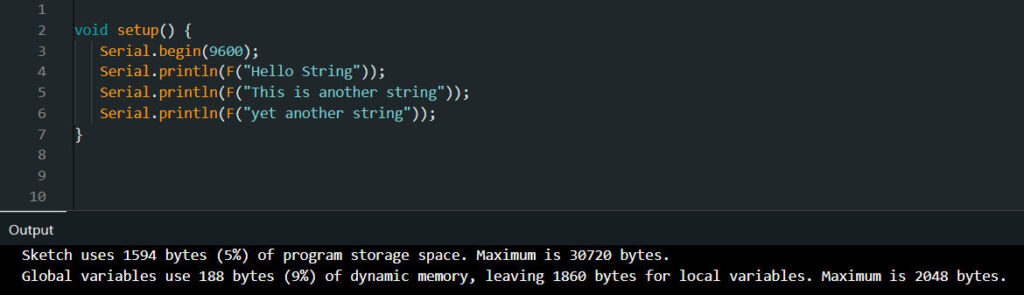
In this example, the memory used with the same text in the three strings drops to 188 bytes, a reduction of 54 bytes compared to char[].
Using (__FlashStringHelper*)
const char stringOne[] PROGMEM = "Hello String";

...

Serial.println((__FlashStringHelper*)stringOne);Code language: JavaScript (javascript)
This is an alternative to the F() macro, but it has the same result.
The difference is that it is not necessary to write the string F(“Something”) more than once if it is used in different places in the code.
In this case, a constant is created and only referenced in the above manner where necessary.
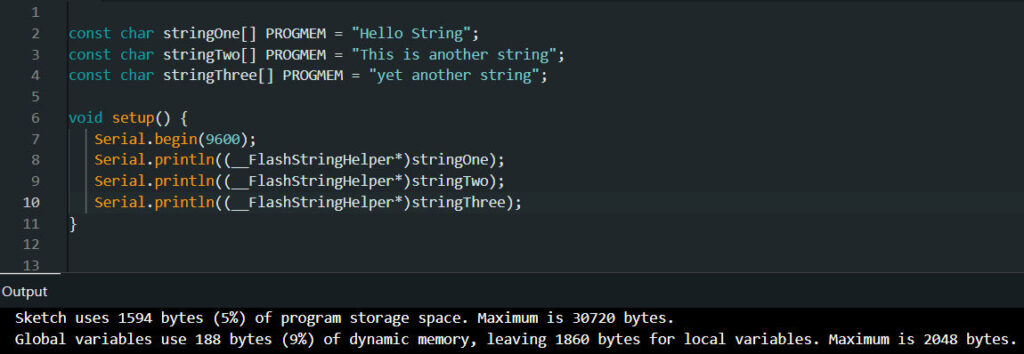
As the output shows, the amount of memory used, compared to the F() macro, does not change.
Using the memcpy_P() function
If you need to load a char[] in order to manipulate it, you need to declare it a bit differently:
const char stringOne[] PROGMEM = "PROGMEM Test";

...

char temporary[20];
memcpy_P(temporary, &stringOne, sizeOf(stringOne));Code language: JavaScript (javascript)
This code declares the string stringOne in program space and then uses the memcpy_P() function to copy it to a temporary variable in RAM.
It’s important to use the sizeOf() function to get the correct string size. Besides being simpler, the compiler allocates an additional character for the “\0,” which is added as a string terminator.
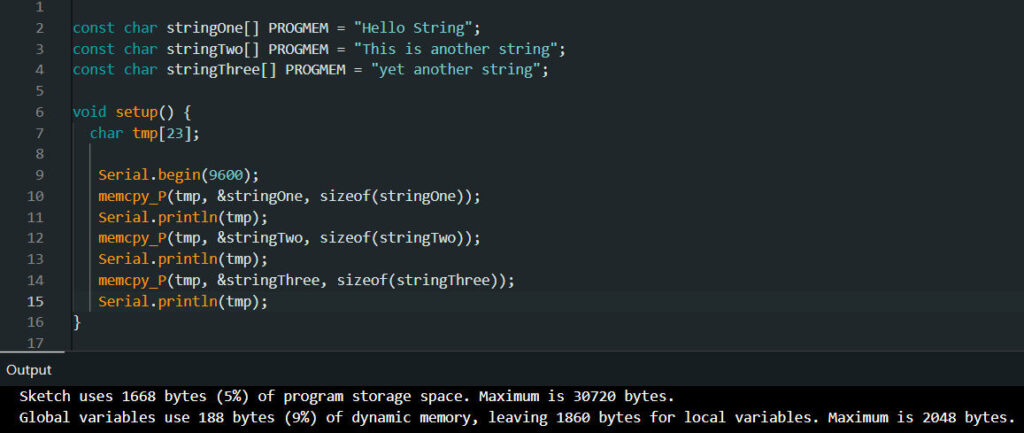
Again, the memory used remains at 188, as the tmp variable is allocated within a function. That is, when the function returns, it will be automatically deallocated.
Conclusion
Should you use the String class or not?
There’s no right or wrong answer to this question. The appropriate answer is “it depends”:
- If you’re using a device with plenty of RAM (like the Arduino Mega, for example) and memory isn’t a concern, the flexibility of the String class can be quite useful.
- On the other hand, if memory is quite limited and string manipulation isn’t complex, you should use char[].
Whichever approach is most appropriate for a specific program, the examples above can provide alternatives for optimizing your code.
Author
